
The SQL query generator built for Salesforce Marketing Cloud
Generic AI chatbots write SQL that looks right and fails in Marketing Cloud: wrong field names, unsupported functions, joins on the wrong key. QAiry generates SQL from your actual account, checks it, and runs it for you.
Why generic SQL generators fail in SFMC
- They don't know your schema. They guess Data Extension and field names, so the query breaks on the first run.
- SFMC SQL has its own rules. Some SQL Server functions aren't supported, and query activities time out on heavy joins.
- Data Views have quirks. Joins on SubscriberKey vs ContactKey, roughly six months of tracking history, and dates returned in Central time.
- A query isn't an audience. You still need a target Data Extension, a matching schema and a refresh schedule.
How QAiry generates SFMC SQL
- Describe the audience in plain language, for example: "Customers in France who bought this year but haven't clicked an email in 60 days."
- QAiry writes the SQL using your real Data Extensions, fields and relationships.
- It validates the query and previews the record count before anything is created.
- It creates the Data Extension in your account, and can refresh it on a schedule.
Example
Request: "Customers in France who ordered in the last 90 days but haven't opened an email in 30 days."
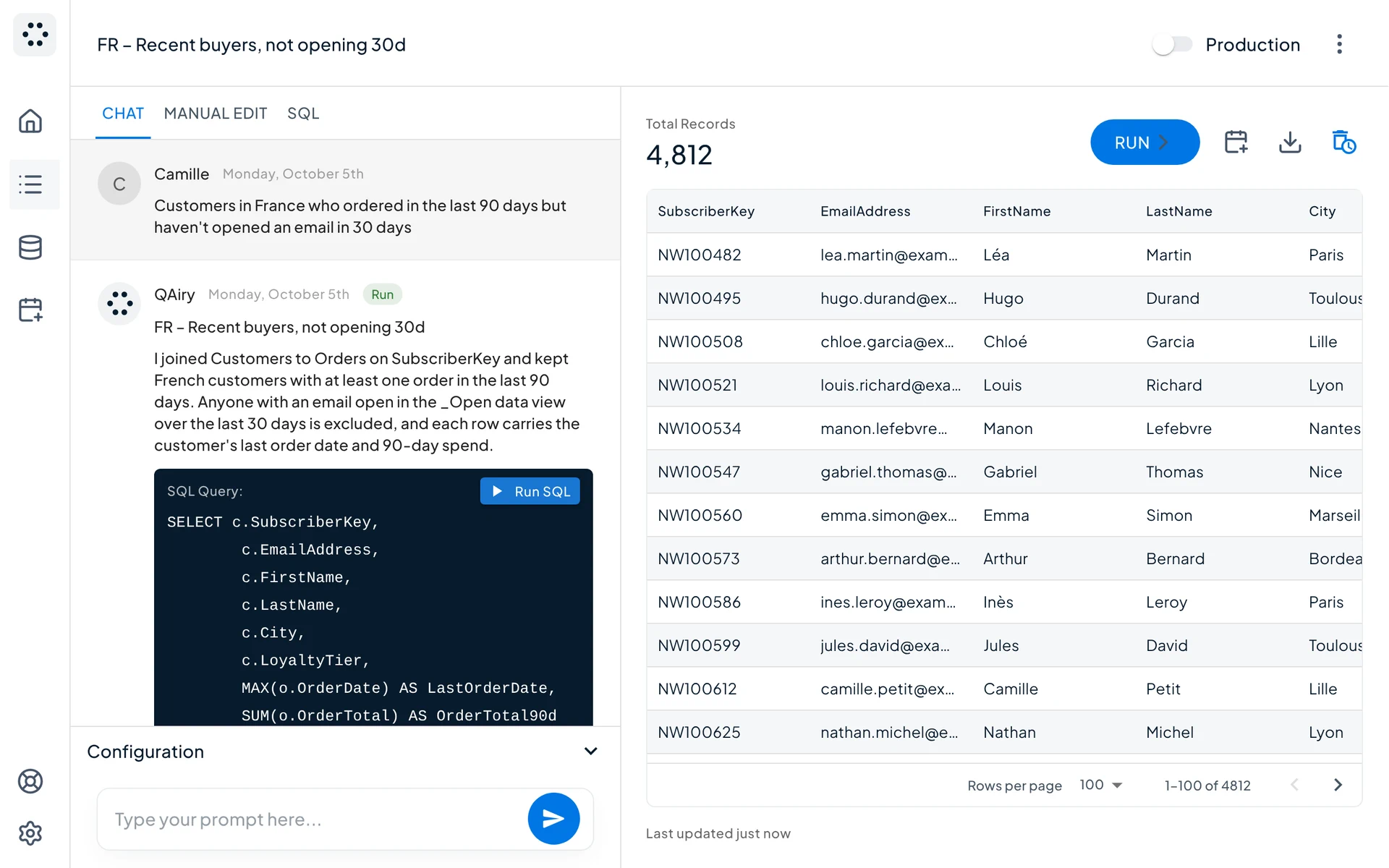
QAiry explains the joins it used, shows the SQL, and previews 4,812 matching records before creating the Data Extension.
For marketers and for SQL experts
- Marketers never need to see the SQL. They chat, check the count and use the audience.
- SQL experts see every query, can edit it directly, and skip writing boilerplate joins. Every version is saved, and any query can be reverted or forked in one click.
FAQ
Is the generated SQL compatible with SFMC Query Activities?
Yes. QAiry writes SFMC-compatible SQL and runs it through the SFMC API.
Can I export or reuse the query?
Yes. You can view and edit the SQL in QAiry at any time.
Does it work with custom Data Extensions, not just Data Views?
Yes. Connect your Data Extensions, define how they relate (one-to-one, one-to-many, many-to-many), and QAiry uses them in queries.
Is my data sent to an AI model?
Only Data Extension metadata (names, fields, types) is used to write queries. Customer records stay in your Marketing Cloud account.
Stop debugging queries
Describe the audience, let QAiry write and validate the SQL, and get the Data Extension in your Marketing Cloud account.

